Hold a key in Word, Outlook or any text field, speak, and let go. The words are typed where your cursor is, cleaned up, and checked. The speech is processed on your own computer, so a client's name, a figure or a strategy never has to travel to a dictation vendor to become text.
How it works
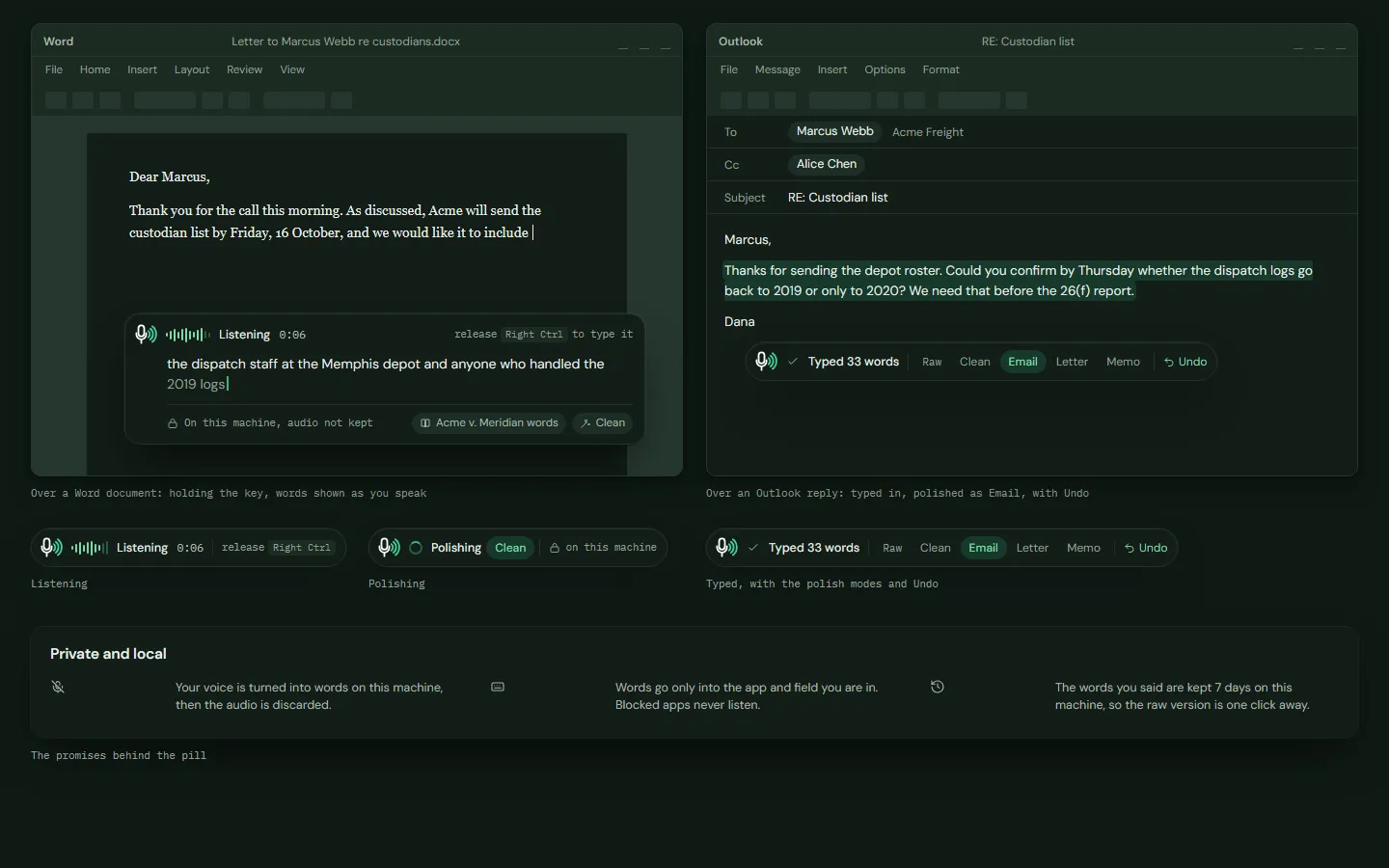
- Hold the key and speak. A small pill floats above whatever you are working in. It does not take focus, so your cursor stays where it was. It shows a level meter and your words as you say them.
- Let go. The pill says "Polishing" while a local model tidies the wording in the style you chose.
- The words appear. They are typed at the cursor, and the pill reads "Typed 33 words" with an Undo.
- Anywhere with a text field. Word, Outlook, your document management system, a browser, anything else. Where there is no text field, it copies the words instead and says so.
Made for legal work
Your vocabulary
It uses the firm's word list. A matter's own list applies only when the dictation is tied to that matter, so one client's terms do not leak into another's.
Names stay with the matter
Correct "Reyez" to "Reyes" and it offers to remember the name for that matter only, not firm-wide, because a party's name is itself confidential.
Polish modes, with a check
Raw, Clean, Email, Letter or Memo, set per app or per press. After polishing, it checks that every number, date, amount, name and citation is unchanged. If anything differs, it types your raw words instead.
Approved clauses by voice
Say a trigger phrase and the firm's approved clause or privilege footer is inserted exactly as written, with no AI involved. Say "literally" first to type the words instead.
Time entries by voice
Say "time: point three, Reyes, call with opposing counsel" in any app. It drafts an entry for a matter you may see, does not guess, and waits for your approval before anything posts.
Simple spoken commands
New line, new paragraph, scratch that and stop dictating. A phrase counts only as a whole utterance after a pause, so "please send it to Ms. Lee" is just text.
What stays on your computer
- The speech model runs locally. Dictation is designed to keep working with the network blocked, and you can check that with your own firewall.
- Audio is not kept. It sits in a short rolling memory window, is discarded right after transcription, and is not written to disk, a log or a crash dump.
- No recording is created. Dictation does not appear in your library, and no speaker or voiceprint processing is applied to it.
- It avoids built-in cloud dictation. Browser and operating-system dictation can send audio to a vendor's cloud, so it does not use them.
Safe by default
- Not in password fields. It is designed not to type into one, and it re-checks that the window and field are the ones you started in.
- Your clipboard comes back. If it uses the clipboard to insert text, it restores what was there and keeps the temporary text out of clipboard history.
- Administrators set the rules. Turn it off, allow only listed apps, lock the polish default, and decide what happens when someone dictates during a recorded meeting: allow, warn or block, by type of matter.
- Dictating during a recording is handled openly. The recording is not muted. The dictated span is marked and kept out of notes, Ask and search, and the user is told their words also reach the meeting audio.
- Built for accessibility. Press-to-toggle is offered instead of holding a key.
Compared with cloud dictation apps
Popular dictation tools are fast, and many are cloud services. That is a reasonable trade for a grocery list. For privileged material it is worth knowing exactly what the vendor says it does.
This comparison describes categories of tools and one vendor's published policy. It is not a review of any product, and VaultScribe is a design preview, not yet a shipped product.
Questions
Does dictation send my audio to the cloud?
It is designed not to. The speech model runs on your computer. Audio is held in a short rolling memory window, discarded right after transcription, and not written to disk, a log or a crash dump. Block the network with your own firewall and dictate to check.
Where can I dictate?
Into Word, Outlook, your document management system, a browser text field or any text field. Where there is no text field, it copies the words instead. It is designed not to type into a password field.
Does the polish step change what I said?
It cleans up wording on a local model, then checks that every number, date, amount, name and citation is unchanged. If the check fails, your raw words are typed instead, and the raw version is one key away.
Does it work on a basic laptop?
Clean polish, which is rule-based, is designed to work on modest hardware. The styled modes need a more capable machine or the firm's own server.
Which languages?
English (US) for the spoken commands. Other languages are not promised until they have been tested.
Read next
Connectors and integrationsThe systems and sources it connects to, and how to add your own.Where VaultScribe fits
Dictation is one part of a private AI workspace for law firms. The same local model powers time entry, drafting and search, and anything that sends, deletes or shares waits for a person's click. I am looking for founding design partners, with a non-binding letter of intent and terms agreed on a call.
Related: A Wispr Flow alternative for lawyers, Legal AI agent for law firms and Private legal AI. General information, not legal advice.