
A private workspace is only useful if it can reach your documents, mail, calendar, billing and research. VaultScribe connects to the systems below, lets an administrator add others, and treats every connection the same way: under the matter's walls, with each outside request in a log you can read.
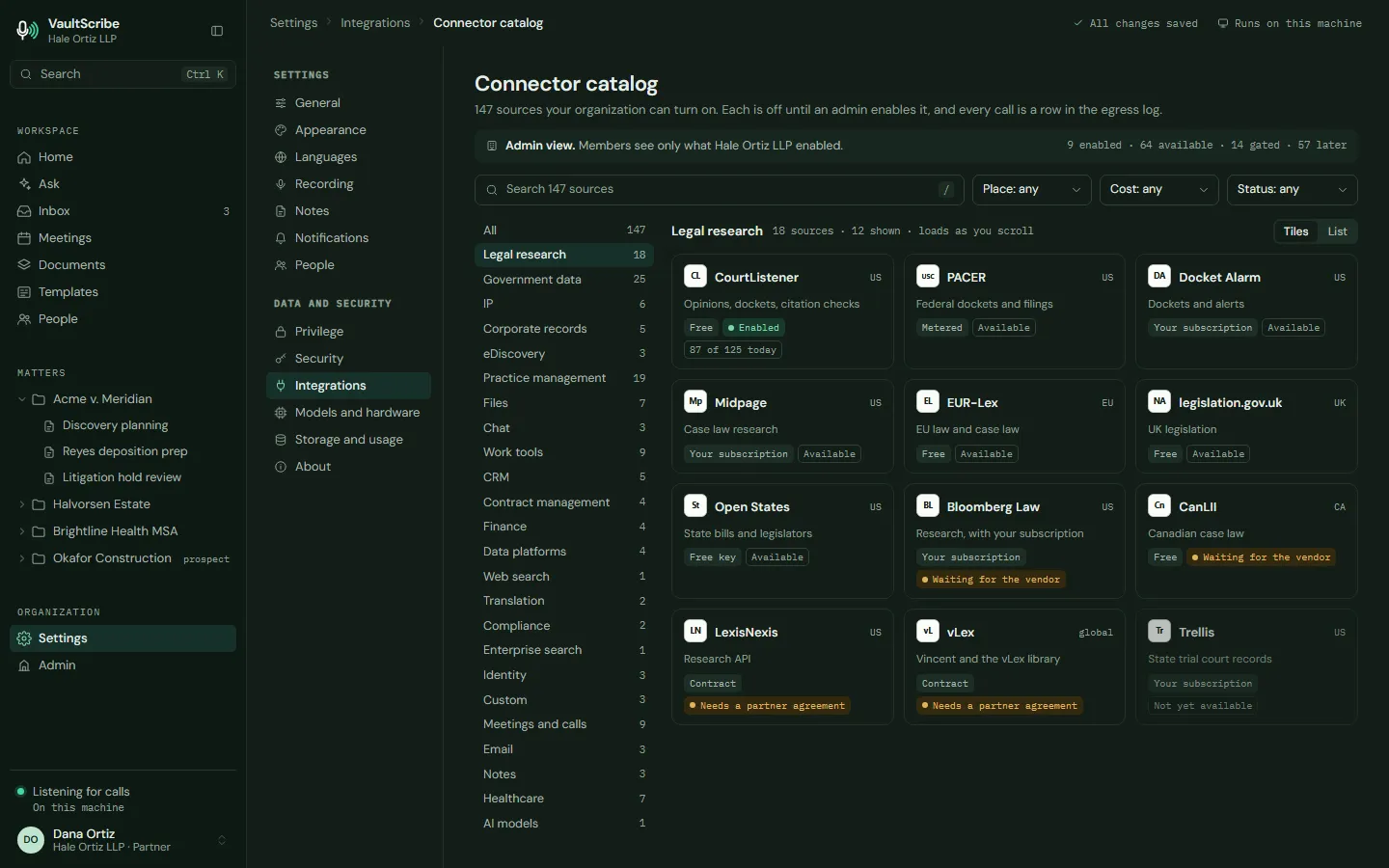
What it connects to
Don't see your system? Tell me which one. Design partners shape which connectors come next.
Add your own
A firm's most useful system is often one nobody else has. There are three ways to bring it in, all under an administrator's control:
- A custom MCP server. Point VaultScribe at a remote or local server that speaks the Model Context Protocol. The administrator reviews the tools it offers and approves it. If its tool list later changes, the administrator sees a diff first and can roll back.
- A REST connector from an OpenAPI file. Give it the description of an internal billing, intake or matter API. It is read-only to start.
- A recipe for a database. Postgres, SQL Server and data warehouses through a local server or the firm's own gateway, using a read-only role. The same recipe pattern covers contract tools, ServiceNow, Trello, ClickUp and Drata.
Every one of these gets its own list of allowed hosts. Nothing is reachable until an administrator turns it on.
How every connection behaves
Live, under your sign-in
A question queries the source at that moment, as the lawyer, within the matter's scope. The query sent out is minimal, not the whole question.
Cited as outside sources
Results carry the system, the document, the version and the time they were read, and are marked as outside material.
Nothing stored by default
Results are not indexed or kept unless the lawyer saves them to the matter, and only where the vendor's terms allow it.
Not used for training
Connector data is not used to train models.
Walls follow the source
Every lookup passes the same policy as a person's own access. If a wall sync goes stale, access is denied. Walled results are dropped before the model sees them.
Actions wait for a click
The agent can draft a Slack message, a Jira issue or a CRM note and show the exact payload. A person clicks to send.
Research is opt-in
Research connectors stay off until an administrator accepts a warning that queries can reveal research topics, and they are off per matter by default. Quota meters show free limits, and billable lookups such as PACER show an estimate first, with caps per user and per matter. A web search option, on the firm's own zero-retention key, is for administrators and is off for privileged matters.
Outside agents come in the same way
Other AI assistants can connect to VaultScribe through a permission-aware MCP server, a local REST API and a command line, under the same walls. The firm decides which agents are approved. See Legal AI agent for law firms for how plans and permissions work.
Questions
Can we connect a system that is not on the list?
Yes. An administrator can add a custom MCP server, build a REST connector from an OpenAPI file, or follow a recipe for a database through a read-only role. Each is approved by an administrator and gets its own allowed hosts.
Does connector data train AI models?
No. Connector data is not used to train models. Results are looked up live under the lawyer's own sign-in and are not stored unless the lawyer saves them to the matter.
What stops a connection from reading a walled matter?
Every lookup passes the same policy as the person's own access. Walls come in from the document management system, and a stale sync denies access. Walled results are dropped before the model sees them.
Where can I see what was sent out?
In the egress log. Each connector shows only the hosts you approved, with the purpose and size of each request. What was sent is not kept in the log.
Read next
Private dictation for lawyersSpeak into Word and Outlook, with speech processed on your own computer.Tell me what your firm runs on
I am looking for founding design partners, and the systems you use help decide what is built first. A non-binding letter of intent, with terms agreed on a call.
Related: A private workspace instead of Notion, Private legal AI and Security and architecture. General information, not legal advice.